
JensenIT Blog
How to Streamline File Sharing for Multi-Site Businesses

The enterprise workforce has long been spread across multiple office sites. But today they’re also working from living rooms, airports, coffee shops and other remote locations. In fact, research shows that nearly two-thirds of organizations today have remote workers. This new reality presents several IT and data management challenges.
With remote teams, file sharing can be cumbersome and slow down productivity due to poor bandwidth. Moreover, if your organization lacks a centralized data management system, storage usage will increase due to unnecessary redundancies. You’ll also risk losing critical data without centralized backup and recovery.
With the right data management strategy, businesses can turn challenges of the modern workplace into advantages that set you ahead of the competition.
Finding the Right Data Management Strategy
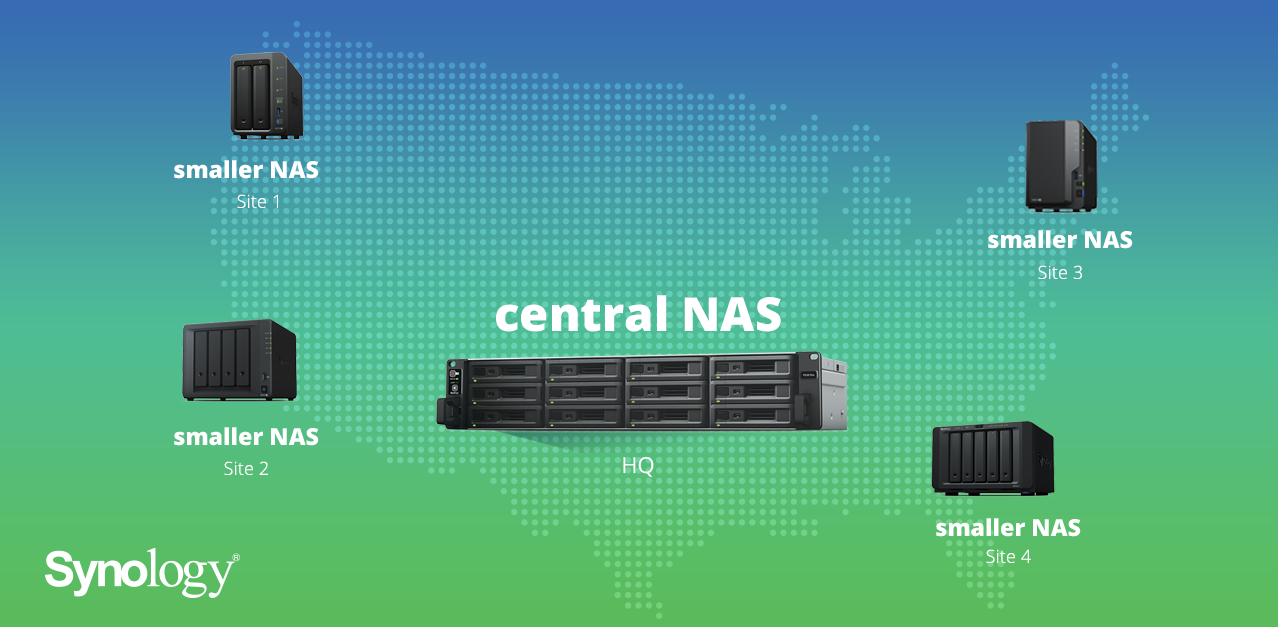
Traditionally, businesses have kept data stored in one server or cloud, meaning employees at remote offices would have to deal with slow transfer speeds. These days, multi-site businesses can set a new structure for data storage and management with large network-attached storage (NAS) device deployed at company headquarters and a smaller NAS at each branch office. From there, you can easily sync files between NAS systems and across offices.
As one example, you could set up Synology’s XS/XS+ series at HQ, which accommodates over a petabyte of storage capacity. For branch offices and other remote locations, you might consider a model from Synology’s Plus series, which offers storage capacity and performance suitable for smaller offices. The ability to scale easily and sync with your central NAS — while using the same software suite — is one of the chief perks of a solution like ours.
Benefits of a Synology NAS Device
While your exact setup might vary from the example above, this overall approach to data management yields powerful results. By deploying NAS devices at each business site, employees don’t have to connect to HQ directly, which means they enjoy faster read/write access. To make things even easier, they can map to a network drive and save time (and confusion) by not having to email large files back and forth.
With this new structure, you’ll also reduce resource usage. Since files are synced to the local NAS rather than employees’ individual computers, there will be less redundant files taking up storage space. This also makes it easier to manage and reduce office bandwidth consumption.Additional strategies for multi-site data management
With a Synology NAS deployed at HQ and each business site, it becomes possible to set up a data backup and disaster recovery plan without having to rent space from another vendor. This not only protects your data in the event of a disaster but also saves you the headache of dealing with multiple vendors, whose license fees can really add up.
You’ll also want to consider a Centralized Management System (CMS), which saves IT admin time and effort by allowing them to manage multiple NAS devices from one central location, rather than having to physically visit each office with a NAS setup. With Synology’s CMS, IT admins can use a single dashboard to check the status of each server and keep each server’s software up-to-date, as well as delegate administrator permissions to specific employees, allowing them to manage certain settings on specific servers.
For more assistance with network-attached storage solutions from Synology, you can lean on the team here at JensenIT. We have the experience necessary to optimize your use of this technology, as well as the others that your business relies on. Give us a call at (847) 803-0044 to learn more.
About the author
Comments